MACCC (MP3 Automagic CD Cover Creator) creates printable CD covers (front and back for full-size cases, front only for slimline) for MP3 CDs. These covers are great for use with in-dash car MP3 CD players. The covers it outputs are in CDInsert format, CDRLabel format, HTML, plain .txt, and now in PDF format too.
Why?
I wrote MACCC because I have an in-dash MP3 CD player in my car and since most of my CDs have over 100 songs on them, I needed a way to see a listing of all the songs WITH TRACK NUMBERS so I could type in the song number on my MP3 CD player and go straight to the song I wanted.
Every other CD Cover maker I found would not do what I wanted:
- print front and back covers
- number the tracks
- number The directories
- look good
The closest thing I found was CDRLabel(and the new 7.0 version is even closer) but it still didn’t meet my needs exactly. Then I found CDInsert and that made realy nice covers but there was no way to scan a CD. MACCC will output a .txt file with the tracks (use it with any printing program you want), a CDRLabel-compatible file (load it in CDRLabel and print), and a CDInsert file (submit it to the CDInsert site and then print out the PDF). These produce NICE covers that meet all of my needs. I especially like the CDInsert format – that is now my cover format of choice.
I have just (7/27/2005) finished adding support for native PDF output so MACCC now outputs PDFs on its own with no need for any helper apps. Output a PDF, load it into a PDF reader, and print it!
MACCC is free for home use and is not disabled in any way. Use it at home for as long as you like for free. But…if you really like it and use it, feel free to send me a buck or two (or more) to support its development. I can take paypal or email me for alternate methods.
Requirements:
- Java. You must have java installed. If you don’t have Java installed, go to http://java. sun.com and download and install it. You must have java version 1.4 or higher installed
- MP3s. Either on CD (preferable) or on your hard drive. You can point it to a directory on your hard drive containing MP3s and it can make a CD cover for those. Useful for checking your MP3s to make sure they have ID3 tags, etc.
- A windowing OS. This is a GUI application so if you are runnning a Unix variant, you must have a graphical display (i.e. – it won’t work on command-line only machines. (If you are running Windows, you’re fine.)
Features:
- FREE for home use
- Reads ID3 tags for display of tracks (can also use filenames if needed)
- Numbers tracks – great for MP3 CD players
- Allows editing of individual song names if needed
- Automatically checks for new versions
- Prints total playtime of directories
- Prints total playtime of entire CD
License:
MACCC is completely free for non-commercial (home) use. If you are using this in a business (either for your employees or your customers) then you should purchase a commercial license for it. I can’t think of a reason someone would use this in a business, but e-mail me if you do need a business license.
Source Code/Modifications:
I have decided not to release the source code to the general public at this time. I thought about going open source with it but haven’t decided to yet. If you are a home user and are curious how I did something, just ask. If you are a commercial user and would like to customize MACCC, please contact me. If your company wants a version of MACCC that looks or acts differently, I am available for contract work and can make the modifications for you.
Screenshots:
A bunch of screenshots are located here.
Updated 7/29/2005
Samples:
There are samples of every different output type in this directory.
Download/Install:
NOTE: There is a bug in the code right now that causes MACCC to just hang when you run it. To fix it:
- Unzip the MACCC.zip to a directory
- run it with either .bat file
- it will hang. Stop MACCC.
- You should now have a config.properties file in the directory where you unzipped it. Open up the config.properties file in any text editor (Notepad or whatever you have) and change the line that says “SHOW_SPLASH=true” to “SHOW_SPLASH=false”.
- Now re-run MACCC and it will work.
Download the MACCC zip file then unzip it to any directory. That’s the entire install. No registry entires or anything are created. If you delete the directory you just created, all traces of it are gone.
Running MACCC:
Windows:
If you are running on Windows and have Java installed and available on your path, you should just be able to run the
runme.bat file. If Java is installed but not on your path, you’ll have to edit the runme.bat file so that it points to the full path of your java.exe. So, this:
java -jar maccc.jar
becomes
<path to your java.exe> -jar maccc.jar
so it might be something like:
“C:\Program Files\Java1.4\java.exe” -jar maccc.jar
Linux/Unix:
Pretty much the same as the Windows instructions except there is no runme included. To make it easy for yourself you probably want to write a startup script so that it will run or just type java -jar maccc.jar to run it. I’ll assume that if you’re running linux/Unix you know what you’re doing. If you make the .bat files executable with chmod, they will actually work on linnux. Email me if you can’t get it to work
Macintosh:
I have been told that it works great on a MAC. Just double-click on the included .jar file!
How to Use :
There are more complete docs within the program, and you can point at just about everything in the program and get a popup tool tip to help you, but here is a brief HOWTO:
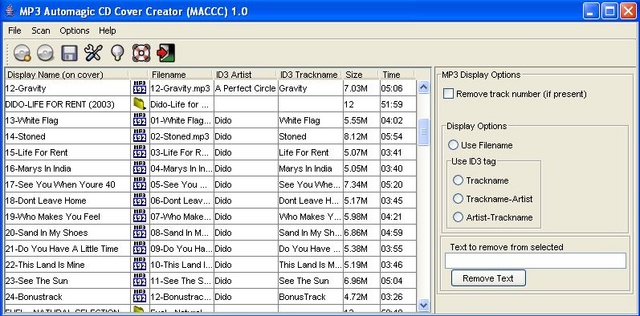
When it first comes up, press the Green cog/wheel to go to the Options. Set all of those with the options you want. Now press the CD button to scan. Choose your CD drive with an MP3 CD in it (or choose a directory on your HD with MP3s). The program will scan for MP3s and show them to you in the main window. The column on the left is what will be output. The other columns are data/info about the directories and MP3 fils – these are not changeable. Select files or directories on the left then choose the format from the options on the right and you’ll see the Display Name text change. You can edit individual names by double-clicking on the Display Name and editing it.
If an MP3 file does not have an ID3 tag it will be marked with 3 red ???s. If the format you choose is using ID3 tags, the Display Text will show 3 red ???s. the easiest thing to do is select all of the files with ???s and then choose “Use Filename” and the Display Name will use the filename. If the filename isn’t what you want to use, you’ll have to edit them by hand.
If you have accurate ID3 tags on all of your MP3 files, you can make covers REALLY quick since you won’t have to edit anything by hand.
Once you get the names the way you want them, hit the “write covers” button in the toolbar (the floppy disk). That will output the cover(s) into the directory you have chosen. You can use the .txt file any way you want, the .clbx file can be loaded into CDRLabel, and the -cdinsert.txt file is perfect for using with CDInsert. HTML outputs HTML, and PDF will output a pdf file – this is the best to use for CD inserts. Play around with it to get the output just how you want it. Email me if there is a feature you want that is not in the program.
Future/Contact
There are lots of features I want to add, but it works fine as-is. You can email me with feature requests, bug reports, etc.
If you have ANY questions or comments, don’t hesitate to e-mail me. I want this to be easy to use/setup so if something is not clear, let me know so I can make it explain it better. Also, if there are any features you want MACCC to have, let me know!
Links:
- CDInsert
- CDRLabel
- JoeShmoe (Java MP3 library used by MACCC)
- Directory chooser control
- Java